


Nowadays, who doesn’t have a mini supercomputer in their pocket or wallet? Smartphones are everywhere- it’s kind of hard to imagine a world without them, right?
They can do so much more other than basic calling, texting, and accessing the internet. Sadly, some of these features aren’t as easily accessible as others. You could even say some are hidden.
Today we’re going to go over 27 hacks that will save you time, trouble, and even money in some cases. Trust us, some of these will make your jaw drop to the floor, so bring out your phone and try them all out!
1. Trust Your Home
It’s advisable to have a passcode on your phone. Yes, we know, sometimes entering your passcode is annoying but it’s just safer to have the feature turned on.
However, you don’t always have to use a passcode if you don’t want to. On your Android device, turn it off by going to your Settings > Lock Screen > Smart Lock. This will enable you to unlock your phone without a code or fingerprint if you’re at home, for example.
2. Save Battery
You won’t be able to recharge your phone on thin air but you can save precious battery percentages by turning on the Flight Mode feature. This will put a stop to a lot of operations that eat up your battery without you even knowing, in the background.
3. Use a Keyboard
If your phone’s minuscule keyboard is stopping you from texting or e-mailing your loved ones you can connect an actual keyboard instead!
Wireless keyboards will connect via Bluetooth so even if you change devices you don’t have to worry about different ports.
You can also connect a mouse!
4. Check What Your Phone Knows About You
Smartphones are designed to collect huge amounts of data from their users. From your name to which app you use the most to where you are, all this data is stored and used for various reasons.
If you want to check out what your phone knows about your location and which apps use this information, go to Settings> Privacy > Location Services > System Services on your iPhone.
5. Zoom In
Not everyone was born with 20/20 vision. Sadly, some apps make it especially hard to look at photos… we’re looking at you, Instagram!
By going to Settings > Accessibility > Magnifier you can start zooming in on pictures and text that’s a little too hard to see.
6. Who’s Calling?
You can tell who’s calling you even if your phone is on silent with this nifty trick! If you have an Android device, go to your contact list and edit a specific contact. You might have to tap the View More button at the bottom.
Scroll down and change someone’s vibration pattern so you’ll know who’s calling without having to turn silent mode off if you’ve already set a specific ringtone for that person.
7. Stop Your Music Automatically
If your hands are busy you don’t have to worry about stopping your music. Instead, set up a timer on your phone that will take care of it for you.
On your iOS device, go to your Clock app and navigate to timer. Pick any time and scroll down for the When Time Ends tag. You’ll have to scroll all the way down again and select the Stop Playing option.
Now, then the timer reaches zero, music from Spotify or Apple Music will stop without you lifting a finger.
8. Access More Menus on Your Android
You probably already know that swiping down on your Android device opens up a whole list of options… actually, that list is pretty short! Now swipe down with two fingers for even more quick settings without having to navigate the traditional Settings app.
9. Take Pictures With Your Headphones
If you want to take an awesome selfie without the help of a selfie stick, things can get pretty tricky. Holding your phone at just the right angle while also tapping the photo button is hard!
Well, you have two more options. The most common thing you can do is to take a photo by pressing the volume button. But if even that’s a little awkward you can use the volume button on compatible headphones instead.
10. Discover Twilight
Reading on your phone can become especially tiring and turning down your phone’s brightness might not always help. If you have an Android device, head on over to the Google Play store and download the Twilight app.
The app will sync up to your screen’s brightness and shift the colors around depending on the sun’s cycle. It’s especially helpful early in the morning and late at night.
11. No Dedicated Back Button
Newer phones seem to ditch all their back buttons and getting used to these changes may be difficult. It can feel frustrating trying to relearn how to use our favorite apps.
If you’re using an iPhone you can swipe from left to right on apps such as Mail, Messages, even Safari to navigate to the previous menu or page.
12. Get Notifications on Your Computer Desktop
Use the Pussbullet app to get notifications on your computer desktop. You don’t always have to check your phone and it makes no sense to use two devices at once! Call and Text notifications work too.
13. Restart your phone
It happens to the best of us! Sometimes our phones crash out of nowhere, new or old. To reboot it all you have to do is hold down the power button and the volume button together. Within a few seconds, your phone will come back to life.
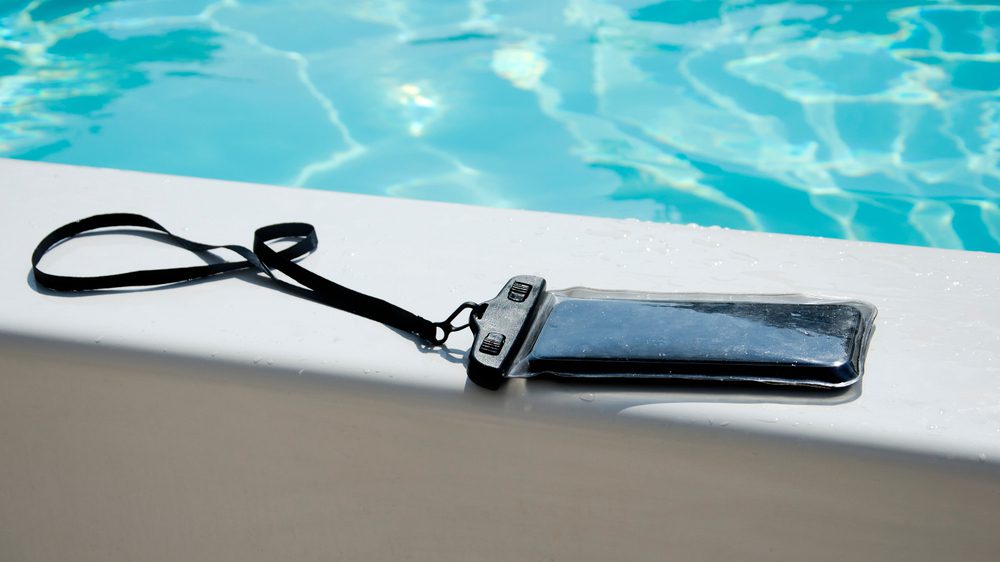
14. Protect Your Phone
Heading to the beach or pool? Don’t forget to protect your phone too! No, we don’t mean slathering it in sunscreen…
Get a waterproof phone case to shield your smartphone from water damage or moisture.
Bonus hint, if you like diving you should definitely invest in a professional diving case too!
15. Boost Your Signal
From time to time your phone might need a little help in finding the strongest signal in an area.
To do so you have to turn it to Airplane mode first, then turn it off. Wait a few seconds before turning it on and switching off Airplane mode. This will help it latch on to a better signal, wherever you are.
16. Preserve Your Battery
Have you any idea how much battery your screen brightness eats ups? Sometimes you may not want to turn Airplane mode on, so it’s best to turn your phone’s brightness down as much as possible.
This will allow you to use any apps you want without cutting contact with your family and friends.
17. DIY Phone Holder
If you don’t have a car phone holder yet but you still need to use your phone for directions, use an elastic band. It works by tying it around your car’s vent!
18. Save on Data
How many of us foolishly go over our data every month? Even when we think we’re being extra careful, it always seems to happen.
That may be because of the apps you’re using, especially if they themselves use Location Services. These may be turned off completely, turned on only when you’re using the app, or turned on permanently- all these settings can be changed for individual apps.
Just make sure to completely turn off the app, don’t let it hang out in the background!
19. Exit Out of Apps
Lastly, make sure there aren’t any apps that are consuming huge amounts of power in the background. You have to start regularly shutting them down. By simply tapping on the back button or opening up a notification, the app you previously use will simply go on standby in the background.
Shut them down completely by swiping up on your phone, then swiping up on the apps you wish to close.
20. Use “Find My Phone”
Always have Find My Phone on, even if you don’t leave your house too often. You never know when it might slip out of your pocket even on a super short run to the store.
This app will help you locate your phone from other devices!
21. Amplify Your Alarm
This nifty DIY trick is so cool, it really gets us going in the morning!
Are you finding it difficult to wake up in the morning, even with your alarm turned on? Put your phone in an empty cup before you go to bed. Make sure the speakers are at the bottom of the cup.
22. Delete Messages
Messages might seem harmless but they take up a lot of storage. iPhone users who are stuck with very limited storage know how annoying this is…
Deleting messages is a great way to clear up some space. You don’t have to delete them all, and you can even screenshot the ones you need to keep, provided we’re not talking about full conversations…
23. Screenshot Directions
Don’t always rely on Google Maps when you’re out and about. Simply screenshot directions when you’re at home and use those photos to navigate the world around you. You’ll save a ton of battery in the process without missing out on important details.
24. Find Your Parking Space
This one is so simple, it might sound pretty obvious!
If you’ve just marked in a crowded parking lot, such as airport parking, take a photo before you leave. That way you won’t scratch your head about where you left your car and you won’t waste time looking for your car.
25. Clean Your Phone
Now, more than ever, it’s important to keep our phones clean. Trust us, you don’t want any of the germs you’ve picked up from door handles anywhere near your face!
Use some rubbing alcohol with a microfiber cloth to wipe both the screen and the back regularly.
26. Set Emergency Settings
Your phone’s emergency settings can be a real lifesaver, so make use of them!
These settings can be used by hospital workers or loved ones even if your phone is locked. You can include your blood type or allergies, medical conditions, emergency contacts and so much more in order to save precious seconds if you’re ever in an accident.
27. Improve Video Audio
If you find that your video audio quality isn’t great you can lightly cover the microphone with your finger. This will help buffer out background noise, just make sure not to move your finger at all, otherwise, all the microphone will pick up is an annoying, scratchy noise.
And there you have it! We hope this list of hacks will help you use your smartphone to its fullest potential! Let us know what kind of hacks you like to use in the comments down below!
Read also:









Leave a Reply